
MeYo : be friends
MeYo StudioSocial
4.47.12K Reviews
- Version
- 3.34.3
- Installs
- 10.00M
- Age Rating
- Mature 17+
Screenshots
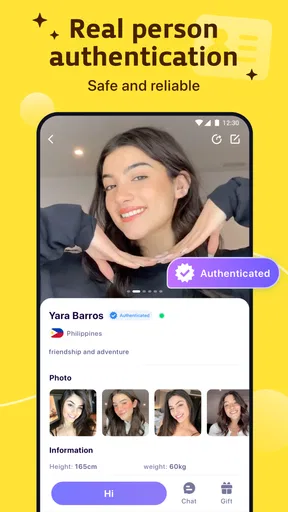
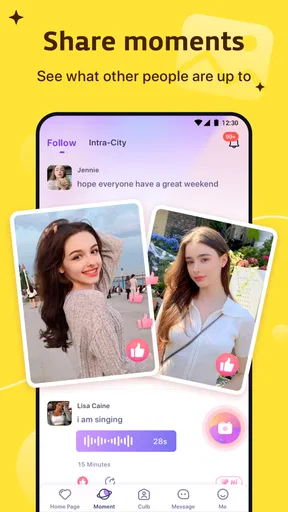

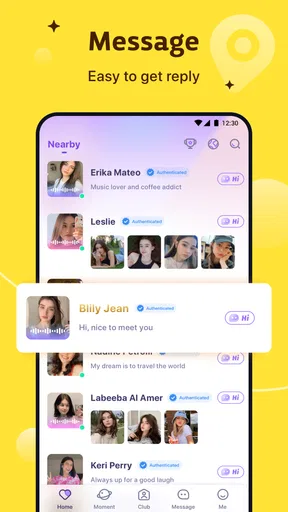
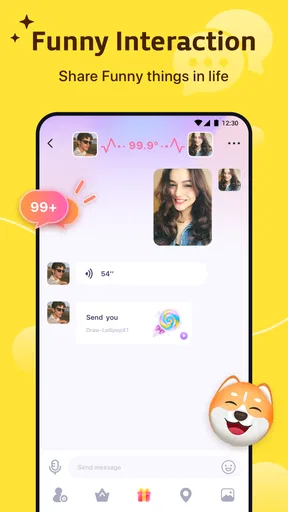
Our Review of MeYo : be friends
 Analysis by Appyee
I approached MeYo: be friends as a social app rather than as a simple messaging replacement. Its appeal is the combination of conversation, games, and a family-oriented social space, all presented under one service from MeYo Studio. That mix can be convenient when a chat needs something more to do, but it also means the first few minutes matter: you are not only learning where messages live, but also deciding how much of the app’s wider social experience you actually want to use.
The app is free to install and aimed at mature users, with a 17+ content rating. It runs on Android devices using version 5.0 or later, and the current version is 3.34.3. Those details make it accessible to many older phones, although access alone does not guarantee a smooth experience; connection quality, storage, notifications, and account setup can still affect the first impression.
Getting past the first points of friction
The most common difficulty with a social app like this is not understanding the idea. It is knowing what to do when the screen does not behave as expected. A delayed message, an empty contact area, or a game that does not open can make users assume the service is broken when the real issue is a temporary connection or an incomplete setup step.
I recommend treating the first launch as a short orientation rather than rushing straight into every available area. Check that the app has finished loading, move through the main screens slowly, and look for the normal signs that your account or profile is ready. If a page appears empty, give it a moment before repeatedly tapping buttons. Social content often depends on network responses, so rapid repeated actions can create more confusion than they solve.
Another useful habit is to separate three different problems: an account problem, a connection problem, and a device problem. If the app opens but messages or social content do not refresh, the network is the first thing I would check. If the whole interface closes or freezes, I would look at the app and phone together. If only one conversation or activity behaves strangely, I would avoid changing everything at once and test another part of the app first.
The best first troubleshooting move is to identify the failing layer before reinstalling anything. That sounds basic, but it protects you from losing useful context and prevents a small temporary issue from becoming a full setup job.
Small setup checks that save time
Before judging the experience, I would make sure the phone has a stable internet connection and enough free space for normal app operation. A weak mobile signal can make a social feed look empty, while a congested Wi-Fi network can cause messages or game-related screens to wait unusually long. Switching between Wi-Fi and mobile data is a simple comparison that often tells you more than repeatedly restarting the app.
It is also worth checking whether the app is allowed to send notifications if you expect timely replies. If alerts are blocked at the phone level, MeYo may still receive activity while giving you no visible reminder. That is not the same as a messaging failure. On the other hand, if notifications are arriving too often, adjusting them at the device level can make the service easier to live with without abandoning it.
Keep the app updated through the normal store process when an update is available, but do not assume every update-related problem requires immediate drastic action. First close and reopen the app, then restart the phone if the behavior continues. If the problem began directly after an update, note exactly what changed: loading, login, notifications, or a particular social area. That description is far more useful than simply saying that the app does not work.
For an older Android phone, I would also close demanding apps running in the background and check whether the system itself is responding slowly. MeYo supports Android 5.0 and later, but an old operating system and limited memory can still make a modern social experience feel sluggish. Compatibility means the app can run; it does not promise identical performance across every device.
Recovering a conversation or activity that stalls
When a message appears stuck, my preferred workflow is gentle and deliberate. Wait briefly, confirm the connection, and try a harmless action elsewhere in the app. If another screen loads normally, the issue may be limited to the original conversation or temporary server communication. If nothing refreshes, close the app completely and reopen it once rather than tapping send repeatedly.
Repeatedly sending the same message is an easy way to create duplicates when the first attempt actually succeeded but the interface failed to update. I would write down or remember the last visible message, reopen the conversation, and check before trying again. This is especially useful when communicating with someone who may be offline or using a different connection.
If a game or interactive area does not respond, I would use the same isolation method. Test a conversation, return to the main screen, and then try the activity again. This helps distinguish a general loading issue from a problem limited to one part of the app. Clearing temporary app data can sometimes help with corrupted local state, but I would use that option carefully and only after making sure I understand how the app handles sign-in and account recovery.
Reinstalling should be a later step, not the automatic answer. A fresh installation can remove local glitches, but it can also force you through setup again. Before taking that route, make sure you can access the account and remember any sign-in details you use. The same caution applies to clearing storage: clearing temporary files is different from erasing all local app data, and the latter can have more consequences.
One practical trick is to change only one variable at a time. Do not simultaneously switch networks, clear storage, update the operating system, and reinstall the app. If the problem disappears, you will not know which action fixed it; if it remains, you will have made the diagnosis harder. A short sequence of controlled checks is slower for a few minutes but faster overall.
When the phone or connection is the real problem
Not every failed interaction is caused by MeYo. Social apps rely on several moving parts: the phone’s network, background activity rules, notification settings, available storage, and the other person’s availability. A message that receives no reply is not evidence that delivery failed, and a quiet social space may simply reflect the people currently using your account or the way your contacts are connected.
Battery-saving modes deserve particular attention. Some phones restrict background activity to extend battery life, which can delay notifications or make an app appear inactive until you open it. If alerts arrive only after launching MeYo, compare the phone’s battery settings with the app’s notification behavior. I would adjust restrictions cautiously, especially if battery life matters more to you than immediate social updates.
Privacy and safety also affect whether this is a comfortable fit. The mature rating is an important signal for families: I would not hand the app to a younger child simply because the interface includes games or friendly conversation. Parents should use the phone’s own supervision tools and discuss who the child can interact with rather than relying on the app’s friendly presentation alone.
For adults, I would still recommend being selective about contacts and personal information. A social app can be enjoyable without turning every conversation into a public introduction. Start with people you know, learn how the interaction areas work, and avoid treating a new online contact as trusted simply because the conversation feels pleasant. That is sensible behavior in any social service, but the blend of chat and activities can make interaction feel more casual than it really is.
How I would use it in everyday life
A realistic use case is a small group of friends who already message each other but want a lighter way to spend time together. Instead of opening one app for conversation and another for a quick activity, they can use MeYo as a shared social space. I would keep the group focused, use the chat for planning, and treat the game element as an optional break rather than the reason everyone must stay active.
That workflow matters because not every friend wants the same level of engagement. One person may enjoy interactive features, while another may only want to exchange messages. The app works better when the group agrees that participation is flexible. Trying to force every contact into every part of the experience would make it feel busier than necessary.
I can also see value for relatives who live apart and want something more relaxed than a formal video call. A short conversation followed by a shared activity can give the interaction a natural rhythm. Still, I would not choose it as my main tool for important work, detailed planning, or communication that needs a strong archive and precise organization. Its strength is casual social contact, not replacing every communication system.
Compared with a conventional messenger, MeYo offers a broader social atmosphere instead of concentrating only on text exchange. That can make it more engaging for people who tire of plain chat. The trade-off is focus: a traditional messenger may feel cleaner when all you want is a quick, dependable message. Compared with a large public social network, MeYo feels more suitable for direct personal interaction, but it is not necessarily the best place for discovering broad public content or following organized communities.
Compared with a dedicated game app, its interactive side is likely to be more useful as a conversation starter than as a deep gaming destination. If you want complex progression, detailed controls, or a single polished game loop, a specialist game will probably serve you better. MeYo makes more sense when the social connection comes first and the activity helps keep the conversation lively.
Cost, expectations, and the mature audience
The app is free, which makes trying it straightforward, but optional purchases range from under a dollar to several hundred dollars per item. That is a wide range, so I would not treat the free download as the complete financial picture. Before confirming any purchase, read the on-screen description carefully, check which account is being charged, and use device-level purchase protections if the phone is shared with family members.
I would also avoid assuming that spending is necessary to make ordinary social use worthwhile. Start with the free experience and decide whether the conversations and activities fit your routine. If the app becomes part of a family device, explain purchases clearly to everyone who can access it. The 17+ rating makes this especially important when younger users might borrow the phone.
The audience size suggests that MeYo is not an obscure experiment. It has passed the threshold of over ten million installs, carries a 4.4 average from around five hundred thirty-nine thousand ratings, and has received about seven thousand one hundred written reviews. Those figures give me confidence that the service has a substantial user base, but popularity does not remove the need to check whether your own friends are willing to use it. A social app is only as useful as the people you can actually reach there.
Who should choose it, and who should skip it
I would recommend MeYo to adults who want chat with an extra social layer, especially if their friends or relatives enjoy casual interactive activities. It is also worth considering if you prefer one place for conversation and light entertainment rather than jumping between a messenger and a separate game. The app’s free entry makes experimentation easy, provided you remain aware of optional purchases and the mature rating.
I would skip it if your priority is a minimal, distraction-free messenger. Someone who wants fast text delivery, a very focused interface, or a work-oriented communication record may be happier with a conventional messaging tool. I would also look elsewhere if your main goal is serious gaming, public community discovery, or a tightly managed environment for children.
People with older or heavily restricted phones should test the basics before inviting a whole group. Confirm that the app opens reliably, notifications behave as expected, and the chosen connection handles loading. If those fundamentals are unstable, the social features will feel frustrating no matter how appealing the concept is.
My practical verdict after using the app
MeYo: be friends is most convincing when I treat it as a casual social hub rather than a universal replacement for messaging, games, or family communication. Its chat-and-activity combination gives conversations another way to develop, and that can be genuinely useful with the right group. The experience becomes less attractive when I need maximum simplicity, specialist gaming depth, or very predictable communication.
My advice is to begin with a small circle, test the connection and notifications, and learn the basic flow before spending money or inviting everyone you know. If something stalls, isolate the problem instead of immediately reinstalling. Check the phone, the network, and the specific screen in that order. That approach makes the app easier to evaluate fairly.
With those expectations, the free app from MeYo Studio is worth trying for mature users who want conversation to include a little more shared activity. I would keep an eye on purchase prompts, respect the age rating, and choose a different tool when focused messaging is the only job. For relaxed social time with friends or family, though, it offers a useful middle ground between a plain messenger and a dedicated game.
Verdict
Strengths of MeYo : be friends
- Simple interface makes discovering and messaging people easy.
- Supports casual conversations without requiring a detailed profile.
- Useful for meeting users with similar interests and social goals.
- Notifications help you keep track of new messages and interactions.
- Free access lets you try the main social features before committing.
Limitations of MeYo : be friends
- Some features may require in-app purchases or a premium subscription.
- Public profiles can raise privacy concerns if too much information is shared.
- User activity and response quality may vary depending on your location.
- Like many social apps, it may include advertisements or promotional content.
- You may encounter inactive, misleading, or unsuitable profiles.
Similar Picks in This Category
View All
Meta Platforms, Inc.4.6

Instagram4.0

Likee-Live, Chat & Party Games
Likeme Pte. Ltd.4.4

Facebook Lite
Meta Platforms, Inc.4.5

TikTok - Videos, Shop & LIVE
TikTok Pte. Ltd.4.0

Moj: Free Short Drama & Reels
ShareChat4.1
Frequently Asked Questions
What is MeYo: be friends, and what can I do with it?
MeYo: be friends is a social networking app focused on helping people meet and chat with new friends online. After creating a profile, you can explore other users, start conversations, and potentially build connections based on shared interests or location. The experience is designed around casual social interaction, so it may be useful for users looking to expand their online circle rather than manage existing contacts only.
Is MeYo: be friends free to download and use?
The app can generally be downloaded without an upfront charge, but some features may depend on in-app purchases, virtual items, subscriptions, or other premium options. The exact availability of free messaging, profile discovery, boosts, and additional communication tools can vary by platform, region, and app version. Before spending money, check the pricing details shown inside the app and review the store listing carefully.
Is MeYo: be friends safe for meeting and chatting with strangers?
As with any social app that connects you with people you do not know, MeYo: be friends requires sensible privacy and safety habits. Avoid sharing your home address, financial information, passwords, or private documents, and be cautious if someone pressures you to send money or move the conversation elsewhere. Use available blocking and reporting tools, and remember that profiles may not always represent a person accurately.
Does MeYo: be friends require access to my location, camera, or microphone?
The permissions requested can depend on which features you use and the operating system on your device. A social app may request access to photos for profile images, the camera for taking pictures, the microphone for voice features, or location for discovering nearby users. You can review and manage these permissions in Android or iOS settings. Only grant access that you are comfortable providing.
Can I delete my MeYo: be friends account if I no longer want to use it?
You should be able to manage your profile and account through the app’s settings or support options, although the exact steps may differ between Android and iOS versions. Deleting the app from your phone does not necessarily delete your account or stored information. Look for an account deletion, deactivation, or privacy request option, and cancel any active subscription separately before uninstalling the application.
